EXPORT OrderPro for Shopify
Released at May 01, 2014
Every Shopify merchant hits the same wall. Orders are trickling in at 100 a month and manual exports feel manageable. Then you hit 400 or 500, and suddenly you're spending Monday mornings filtering, downloading, trimming columns, reformatting dates, and emailing files to three different people — all from the same underlying data you already have in Shopify Admin.
That was the problem I kept running into, and that's why I built EXPORT OrderPro.
What Is EXPORT OrderPro?
EXPORT OrderPro is a Shopify embedded app that gives you control over what order data you export and when it goes out. It runs directly inside Shopify Admin — no separate login, no third-party dashboard.
Three things drive every export:
- Which columns appear in the file (your warehouse team doesn't need billing data; your accountant doesn't need shipping weights)
- Which orders are included (filter by fulfillment status, payment status, order tags, shipping country, product, and more)
- When it runs (manually on demand, or automatically on a daily/weekly/monthly schedule, delivered to the right inbox)
The output is a CSV, Excel, XML or HTML file formatted exactly the way your downstream tool — accounting software, warehouse system, 3PL portal — expects it.
What It Does in Practice
Custom Report Designer. You pick the columns, name them whatever your import tool expects, and drag them into the right order. Save it as "Warehouse Fulfilment" or "Accounting Monthly" and reuse it on every export. Shopify's built-in export gives you all 50+ fields every time; EXPORT OrderPro gives you exactly the 8 you need.
Filter Editor. Build conditions with AND/OR logic to narrow which orders qualify. Common setups: unfulfilled + paid orders for daily pick lists; refunded orders for monthly reconciliation; orders containing a specific product for supplier reports. Filters are saved separately from report designs so you can mix and match them freely.
Automated Scheduling. Set a report and a filter, choose a time and frequency, enter one or more email addresses, and activate. The export runs on schedule and lands in the right inbox without anyone touching a button. According to Shopify's 2023 Annual Report, more than 1.75 million merchants are selling across 175 countries on the platform — most of them with recurring data needs that repeat every single week.
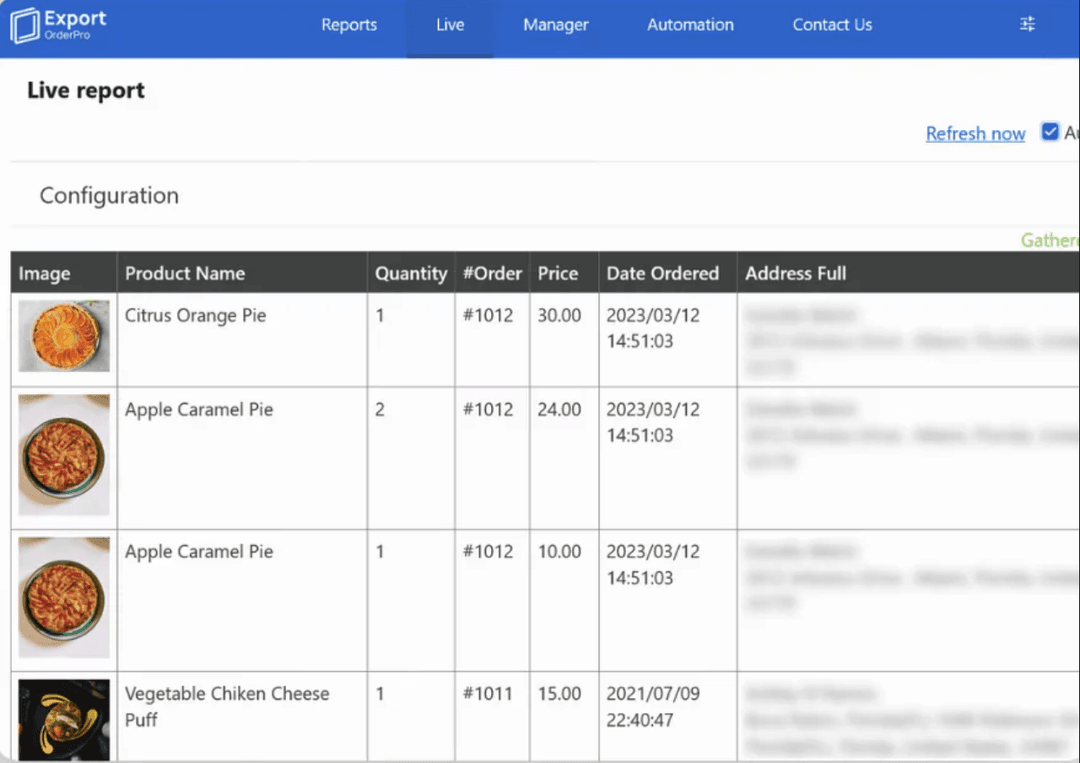
Live Preview. Before committing to any export, the Live view shows you a real-time table of exactly which orders would be included with your current settings. It's the fastest way to catch a filter mistake before it becomes a problem downstream.
Export History. Generated files are retained for several days so any team member can re-download a report from the History tab without re-running the export.
Why I Built It
The pain point is simple: Shopify's native order export is designed for one-off use. It gives you a fixed CSV with every field for every order, and you're on your own after that — no scheduling, no column selection, no conditional filtering, no delivery routing. For a store with one export and one recipient, that's fine. For a store with a warehouse team, an accountant, a marketing manager, and three suppliers each needing a different slice of the same order data every week, it's a workflow that breaks constantly and takes real hours to maintain.
I built EXPORT OrderPro so that setup takes 10 minutes once, and then the right data gets to the right person automatically — every time.
Who Is It For?
- Shopify merchants processing 300+ orders per month who spend time each week on manual exports
- Operations and logistics teams who need role-specific pick lists and fulfilment reports on a daily schedule
- Accountants and bookkeeping clients of Shopify stores who need clean, predictably formatted revenue files each month
- Stores with multiple suppliers or fulfilment partners, each needing their own filtered view of order data
If you're running one export a month with a handful of orders, Shopify's built-in export is probably enough. If you're coordinating data across multiple teams on a recurring basis, EXPORT OrderPro is built exactly for that.
Got questions? I’d love to hear from you — just drop me a message via the site or connect on LinkedIn.